
The alarm you have to earn.
Roosta is a mission alarm clock for iOS and Android. It keeps ringing until you solve, move or scan your way out of bed, so you cannot dismiss it half asleep and remember nothing.





- Works offline
- Nothing leaves your phone
- Never locks you out
Time to rise!
7:30
Four steps, every morning
An ordinary alarm asks for one tap, which is something a sleeping person can do. Roosta asks for something a sleeping person cannot.
Set the alarm
Pick a time and a mission. The schedule is handed to the operating system immediately, so it survives a restart.
It rings
At full volume, on the lock screen, whether or not the app is open. There is no dismiss button.
You do the mission
Solve arithmetic, walk twenty steps, or point the camera at a mug. Verification happens on your device.
It stops
The alarm ends the moment the mission is verified, and your streak continues into tomorrow.

18 missions, in four families
Different people wake up differently. A puzzle works for someone who dismisses alarms unconsciously; nothing but standing up works for someone who does not remember the alarm at all.
Cognitive
4 missions
Missions that make you think. Best for people who can physically get up but dismiss the alarm without ever forming a memory of it.
Camera
6 missions
Missions that make you walk somewhere and point the camera at something. All recognition runs on your device, and frames are never saved or uploaded.
Mindful
2 missions
Missions that ask you to read something aloud. Speaking wakes you differently from tapping, and it sets a tone for the morning rather than just ending a noise.
What if I genuinely need to get out?
Every mission has a timeout, and an escape hatch opens after a delay you configure, regardless of how the mission is going. Roosta is designed to add friction to a half-asleep morning, not to hold your phone hostage on a morning you have a flight.
14 × 7
What a Roosta morning actually looks like
Four screens, in the order you meet them: the alarm you set the night before, the one that will not take a tap for an answer, the mission that ends it, and the snooze chain that stops happening.
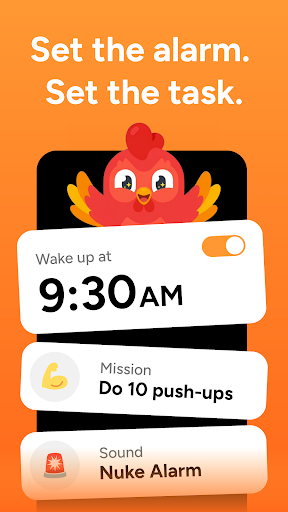
Set the alarm, set the task 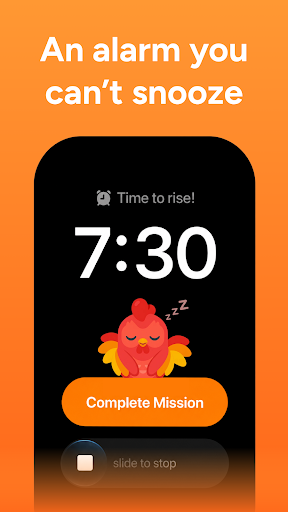
An alarm you cannot snooze 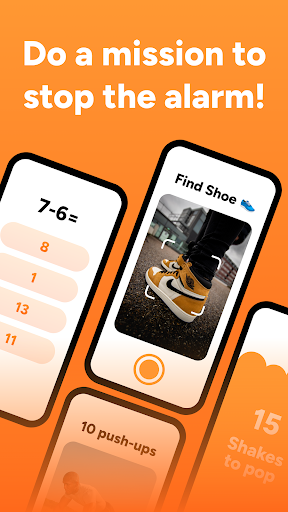
Do a mission to stop it 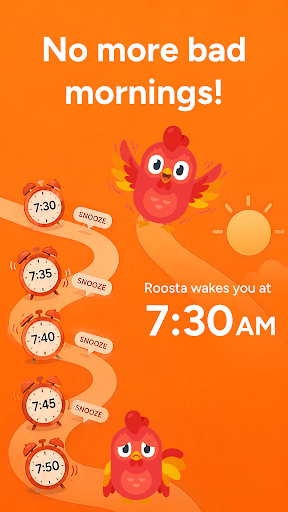
The snooze spiral ends
Why Roosta
Four promises the rest of the category does not make
These are engineering constraints in the codebase, not marketing angles, which is why they are the things worth judging us on.
The OS owns the alarm
Alarms are scheduled natively, not by JavaScript running inside an app the system can kill. This is the answer to the worst review any alarm app gets: it did not go off.
Nothing needs a network
No cloud inference, no remote config, no auth refresh on the ring path. A user with no signal still wakes up, and every mission still works.
You are never trapped
Every mission has a timeout and an escape hatch on a delay you set. Competitors treat entrapment as a feature. We treat it as a support ticket.
Camera frames never leave
All recognition is on-device. Frames are never written to disk and never transmitted. No competitor in this category makes that promise.
Pricing
Paid, so it is never funded by ads.
The most common complaint about the biggest app in this category is the advertising in its free tier. Roosta has no free tier to put ads in, and every plan below unlocks exactly the same app.
Weekly
$3.99per week
Cancel whenever.
Yearly
$39.99per year
Opens with a 7-day free trial.
Lifetime
$99.99one payment
Buy once, no renewal.

Find a mug
On device · nothing saved
Privacy
Nine missions use the camera. Zero photos stored.
Camera missions ask you to find a mug, a pet, a patch of sky. Recognition happens entirely on your phone using on-device vision. The frame is analysed and discarded in the same instant, never written to storage, never uploaded, never seen by us.
That also means they work with the network off, which is the same reason the alarm itself does.
Progress
A streak you cannot fake
Every wake-up is recorded, and your streak and stats are recomputed from that history each time you open the app. Nothing is a stored counter that can drift out of sync with what actually happened.
Miss a morning and the mascot shrugs. It never guilt-trips you. The mechanic is already adversarial, and the rooster is the counterweight.
Good morning
12Next wake-up
Tomorrow
6:40 am
Rings in 8h 12m
Math
Mission
Sunrise
Sound
Today's wake-up
Sleep tight
Set an alarm to begin your streak.

Questions,
answered plainly.
What is a mission alarm clock?
A mission alarm clock is an alarm that cannot be dismissed with a single tap. Instead it keeps ringing until you complete a short task: solving math, walking a set number of steps, or photographing an object. The task is what proves you are actually awake.
What happens if I cannot finish the mission?
Every mission has a timeout and an escape hatch that opens after a delay you choose. You are never locked out of your own phone. Friction is the point of Roosta; entrapment is not, and an alarm that made someone miss a flight is a failure, not a feature.
Does Roosta work without an internet connection?
Yes. Nothing on the alarm path needs a network. Alarms are scheduled by the operating system, sounds are stored on the device, and camera missions run on-device. Roosta works in airplane mode, in a hotel with no signal, and on a phone with no SIM.
Does Roosta store photos from camera missions?
No. Camera missions analyse the live frame on your device and discard it immediately. Nothing is written to storage and nothing is uploaded. This is an architectural constraint in the app, not just a line in a privacy policy.
How much does Roosta cost?
Roosta is a paid app with no free tier and no advertising. There are three plans, all unlocking the same app: $3.99 a week, $39.99 a year with a 7-day free trial, or $99.99 once for lifetime access. Prices are shown in your store currency.
Will Roosta wake me if the app is closed?
Yes. Alarms are registered with the operating system, so they fire whether or not Roosta is running. The app being swiped away, the phone restarting, or the battery saver killing background processes does not cancel a scheduled alarm.